- *KO*-"머그 샷 ~ DIY2 인치 / 1 인치 = 플레이아데스 비싼 인쇄 비용 오의 사진을 많이 저장! 자신에게 제조 "~*
*-近來覺得在相館冲印2吋、1吋大頭照,真的太貴了喔
前不久...姊妹才去冲印了2吋、1吋各一組,
要價120元/1組--1組8張,
洗了2組,總共240元....傻眼....喔
'其實可以自己編排後再拿去相館沖洗
首先在家開啟PhotoImpact或Photoshop...之類的繪圖軟體
開啟新檔,選擇4X6的格式大小
畫八個格子(共2列),可以放入8張2吋大頭照
畫十個格子(共2列),可以放入10張1吋大頭照
編排好後就可以直接拿到相館沖洗了
洗一張4X6照片=4元,沖洗好後拿回家,
自己剪刀、美工刀裁切一下,搞定
拿到相館沖洗一組的錢(120元),
可以洗30組大頭照了,共240張大頭照
這輩子還不知用不用的完。
請放心,自己編排好後拿去相館沖洗的照片
和直接請相館幫你沖洗大頭照一組
紙張都一樣
差別在一個需要自己動手修剪大頭照,一個已經裁切好大頭照
如果臉皮夠厚的話,可以請相館幫你裁切...(應該會被轟出來吧...哈哈)
注意喔!有的相館,看到洗出來的照片4X6 裡面有大頭照
會跟你收一組大頭照的錢...(小妹子的同事...遇到過了)
小子遇到這種情形,應該直接走人換一家相館沖洗...哈..
如果你沒有繪圖軟體可以編排,可以考慮看看這套
輕鬆製作出你想要的樣式。(樣式如下圖)
USA*(en)-- Recently found in photo shop prints 2 inches, one inch mug shot, really expensive Oh
Not long ago ... sisters before going to print a 2-inch, 1 inch of a group,
Asking price 120 yuan / group - group 8,
Wash the two groups, a total of 240 yuan dumbfounded .... Oh ....
'In fact, you can take your own choreography and then rinse with museum
First home open PhotoImpact or Photoshop ... sort of graphics software
Open a new file, choose the format size 4X6
Painting eight lattice (of two), you can put eight 2-inch mug shot
Painting ten lattice (of two), you can put 10 1-inch mug shot
Choreography can get after a good wash with a museum
Wash a 4X6 photo = $ 4, to take home after a good wash,
Own scissors, knife cutting it, get
Rinse a group photo shop to get the money ($ 120),
You can wash the mug shot of the 30 groups, a total of 240 Avatar
Still do not know in this life is not the finish used.
Please be assured that their own choreography studio and rinse well after take photos
Please direct photo shop to help you flush a mug shot
Paper are the same
Difference in a need-it-yourself trim mug shot, a good mug shot has been cropped
If thick skinned enough, can you please help with museum cutting ... (should be fired come ... haha)
Note Oh! Some photo shop, wash out the photos to see inside the mug shot 4X6
Will receive a mug shot of money with you ... (sister son met a colleague ...)
Kid encounter this situation, you should leave directly change a photo shop flush ... ha ..
If you do not have graphics software can program, you can consider a look at this
Easily create the style you want. (Pattern below) ~
*K0*_최근 스튜디오와 인쇄 2 인치 1 인치 의 얼굴 샷 , 정말 비싼 아 느낌
얼마 전 ... 자매 그룹의 2 인치 , 1 인치 를 인쇄 가기 전에 ,
그룹 8 - 요금부터 120 원 / 그룹 요구
아 .... 두 그룹 , 어안이 벙벙 2백40위안 의 총 을 씻으 ....
' 사실, 당신은 자신의 안무 를 취할 수 후 박물관 씻어
그래픽 소프트웨어 의 첫 번째 집 공개 PhotoImpact 또는 포토샵 ... 종류
새 파일을 열고 , 형식 크기 4X6 을 선택
( 두 사람의 ) 여덟 격자 회화 , 여덟 개의 2 인치 머그 샷 을 넣을 수 있습니다
( 두 사람의 ) 열 격자 회화 , 당신은 10 개의 1 인치 잔 샷 을 넣을 수 있습니다
안무 는 박물관 과 좋은 세척 후 얻을 수 있습니다
좋은 세척 후 집으로 가져올 것이다 ,4X6 사진 = $ 4 씻고 ,
자신의 가위 , 칼 을 절단 , 얻을
돈 ( 120 달러 )를 얻을 수있는 단체 사진 가게를 씻어 ,
당신은 30 그룹 의 머그 샷 (240) 아바타 의 총 씻을 수 있습니다
아직도 이 생활에서 사용 마무리 하지 모르겠어요.
자신의 안무 스튜디오 와 테이크 사진 한 후 잘 헹구어 안심하시기 바랍니다
당신은 얼굴 에 총을 세척 하기 위해 사진관 을 보내주십시오
종이같다
필요 - 그것 - 자신 트림 머그 샷 의 차이 , 좋은 머그 샷 자른 된
충분히 피부 두께 , 당신은 박물관 절단 에 도움을 주시기 바랍니다 수 있다면 ... ( 해고 해야 올 ... 하하 )
아 참고 ! 일부 사진 가게 ,머그 샷 4X6 내부 보고 사진을 씻어
당신과 함께 돈을 마구 총을 받게됩니다 ( 자매 아들은 ... 동료 를 만났다 )
아이가 이러한 상황이 발생 변경할 직접 사진관 플러시 를 떠나야한다 ... 하
당신이 그래픽 소프트웨어 캔 프로그램이없는 경우 , 당신은이 를 살펴 볼 수 있습니다
쉽게 원하는 스타일 을 만들 수 있습니다. (아래 패턴)...
PT(Macau)FDZ-
- Encontrado recentemente em gravuras photo shop 2 polegadas, uma polegada tiro de caneca, realmente caro Oh
Não muito tempo atrás ... irmãs antes de ir para imprimir a 2 polegadas, 1 polegada de um grupo,
Preço de 120 yuan / group - grupo 8,
Lave os dois grupos, um total de 240 yuan estupefato .... Oh ....
"Na verdade, você pode ter o seu próprio coreografia e, em seguida, enxaguar com museu
Primeira casa aberta PhotoImpact ou Photoshop ... tipo de software gráfico
Abra um novo arquivo, escolha o formato 4X6 tamanho
Pintura oito rede (de dois), você pode colocar oito de 2 polegadas tiro de caneca
Pintura dez rede (de dois), você pode colocar 10 1 polegada tiro de caneca
Coreografia pode começar após uma boa lavagem com um museu
Lave uma foto 4X6 = $ 4, para levar para casa depois de uma boa lavagem,
Tesoura próprios, faca de cortá-lo, obter
Lavar uma loja de fotografia de grupo para obter o dinheiro (US $ 120),
Você pode lavar o tiro de caneca dos 30 grupos, num total de 240 Avatar
Ainda não sei nesta vida não é o acabamento usado.
Tenha certeza de que seu próprio estúdio de coreografia e enxaguar bem depois de tirar fotos
Por favor, dirija loja de fotografias para ajudá-lo a liberar um tiro de caneca
Papel são os mesmos
Diferença de uma necessidade-it-yourself aparar caneca tiro, um bom tiro de caneca foi cortada
Se pele espessa o suficiente, você pode por favor me ajude com o corte de museu ... (deve ser demitido vir ... haha)
Nota Oh! Alguns loja de fotografia, lave as fotos para ver dentro do 4X6 caneca tiro
Irá receber um tiro de caneca de dinheiro com você ... (irmã filho conheceu um colega ...)
Kid encontrar nesta situação, você deve deixar diretamente mudar uma loja de fotografia nivelado ... ha ..
Se você não tem programa pode softwares gráficos, você pode considerar uma olhada nisso
Facilmente criar um estilo que você quer. (Padrão abaixo)
--------------------------------------------------------------------------------------*PhotoCap 5.6 大頭照 PhotoCap 5.6/up
軟體名稱:PhotoCap (5.6.... 正式版)
軟體性質:免費軟體
官方網站:http://www.photocap.com.tw/forum/
軟體下載:請點我 (連結至下載頁面)
語言介面:繁體中文、簡體中文、English[多國語言]
可見下方,簡單的說明編排大頭照的流程
安裝完後,請開啟桌面PhotoCap軟體。(如下圖)
PhotoCap 5.6 大頭照


PhotoCap 5.6 mug shot teaching PhotoCap 5.06...
Software Name: PhotoCap (5.06.. official version)
Software nature: Freeware
Official Website: http://www.photocap.com.tw/forum/
Software Download: Please point me (link to the download page)
Language Interface: Traditional Chinese, Simplified Chinese, English
Visible beneath a simple explanation of the process choreography mug shot
프로그램 이름 : PhotoCap (5.06/up... 공식 버전)
소프트웨어 자연 : 프리웨어
공식 웹 사이트 : http://www.photocap.com.tw/forum/
소프트웨어 다운로드 : 나 (다운로드 페이지로 링크)를 지적 해주세요
언어 인터페이스 : 중국어 번체, 중국어 간체, 영어
프로세스 구성법 잔 샷의 간단한 설명은 아래에 보이는 *
*PT(Macau)FDZ-PhotoCap 5.6 caneca tiro ensinando PhotoCap 5.6
Nome do programa: PhotoCap (5,06.. versão oficial)
Software natureza: Freeware
Site Oficial: http://www.photocap.com.tw/forum/
Software Download: Por favor, me aponte (link para a página de download)
Interface do Idioma: chinês tradicional, chinês simplificado, Inglês
Visível debaixo de uma explicação simples do tiro de caneca processo coreografia *
*安裝完後,請開啟桌面PhotoCap軟體。(如下圖)
PhotoCap 5.6 大頭照
*After installation, open the Desktop PhotoCap software. (Below) PhotoCap 5.6/up mug shot *
*KO*-설치 후 바탕 화면 PhotoCap 소프트웨어를 엽니 다. (아래)
PhotoCap 5.6/up 머그 샷 .
*PT*-Após a instalação, abra o software desktop PhotoCap. (Abaixo)
PhotoCap 5.6 caneca tiro
O primeiro passo selecionar [Avatar] (como mostrado na extrema direita) .
*步驟一 選擇【大頭照】(如下圖最右方)*
USA(en)-Step one select [Avatar] (as shown on the far right)
PhotoCap 5.6 mug shot .

*PT(Macau)FDZ-O primeiro passo selecionar [Avatar] (como mostrado na extrema direita) .
*步驟二 選擇要洗的格式,1吋 or 2吋 .....等。(如下圖)
*USA(en)-Step Two Select the format you want to wash,
1 inch or 2 inches ...
.. and so on. (Below)

*KO*-두 등등 당신이 세척하고 싶은 형식, 1 인치 또는 2인치 ..
... 및 선택 단계. (아래) .
*PT(Macau)FDZ-Passo Dois Selecione o formato que você
quer lavar,
1 polegada ou 2 polegadas ..... e assim por diante. (Abaixo)
================
*看不懂的話沒關係,小圖旁邊都附有中文說明。(如下圖)
挑選好後按【OK】。

*USA(en)-Not read the words matter,
beside the small figure comes with Chinese instructions. (Below)
After the selection of good press [OK].
PhotoCap 5.6 mug shot
*KO*-작은 그림은 중국의 지시 사항이 옆에 상관없이 단어를 읽을 수 없습니다. (아래)
좋은 언론의 선택 후 [확인]을 클릭합니다.
*PT(Macau)FDZ-Não ler as palavras matéria, ao lado da pequena figura vem com instruções chineses. (Abaixo)
Após a seleção de uma boa prima [OK].
*步驟三 已經幫你畫好格線了,現在只要將大頭照放上去,
請點選左上【載入照片】。(如下圖紅框處)

now put up as long as the mug shot,
Please click on the upper left [photo] loaded. (Below red box office)
*KO*-세 번째 단계는 당신이 좋은을 그리는 데 도움이되는 그리드가, 지금, 한 잔 샷으로 올려
왼쪽 상단 [사진]로드를 클릭하십시오. (빨간 박스 오피스 아래) .
*PT(Macau)FDZ-Passo três tem uma grade para ajudá-lo a
desenhar um bom, agora colocar-se, desde que o tiro de caneca,
Por favor, clique no canto superior esquerdo [foto] carregado. (Abaixo bilheteria vermelho) .


*步驟四 在【A區】尋找自己的大頭照,找到後按滑鼠左鍵一下
→ 按B.【加入照片】
→ 按C.【OK】
*USA(en)-Step Four In A Zone [] to find their own mug shot, later found by clicking the left mouse button
→ Press B. [add photos]
→ press [OK] C. .
*KO*-네 단계 지역은 [] 후 마우스 왼쪽 버튼을 클릭하면 찾을 자신의 얼굴에 총을 찾으려면
→ 보도 B.이 [사진 추가]
→ [OK]를 누릅니다 C.
*PT(Macau)FDZ-Passo Quatro em uma zona [] para encontrar
o seu próprio tiro de caneca, mais tarde encontrado clicando
no botão esquerdo do rato
→ Prima B. [adicionar fotos]
→ prima [OK] C.

*步驟五 右上角紅框處,可以進行微調,8個黃點可以拉大拉小,
拉小後可以任意移動
大頭照位置適中(不會偏左偏右偏上偏下)後,按【輸出大頭照】。
(如下圖)
*USA(en)-Step Five red box at the top right corner, you can fine-tune,
eight yellow spots can pull big pull small,
After pulling a small can move
Avatar moderate position (not left-right bias on the lower side),
press the [output] mug shot.
(Below) .
*KO*-오른쪽 상단 모서리에 5 빨간 상자 단계, 세부적으로 조정할 수 있으며, 8 개의 노란색 반점이 작은 큰 풀을 당길 수있다,
작은 이동할 수 있습니다 당기는 후
아바타 적당한 위치 (아래쪽에 있지 좌우 바이어스), [출력] 머그 샷을 누릅니다.
(아래) .
*PT*(Macau)FDZ-Passo Cinco caixa vermelha no canto superior direito, você pode ajustar, oito manchas amarelas pode puxar grande atração pequeno,
Depois de puxar um pequeno pode mover
Avatar posição moderada (bias não esquerda-direita no lado inferior), pressione o botão [saída] caneca tiro.
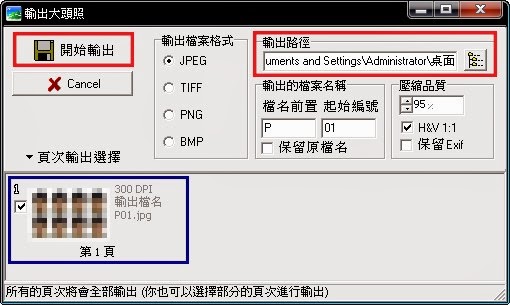
【輸出路徑】可以改在桌面,方便等等檔案轉出後好找。
*USA(en)-Step Six change the output path [start] → press [output] to complete.
[] Output path can be changed after the desktop for easy file
transfer out so good looking.
*KO*-완료하는 데 6 단계 출력 경로를 변경 [시작] → 키를 눌러 [출력].
[] 출력 경로를보고 너무 좋아 쉽게 파일 전송하기위한 바탕 화면 후 변경할 수 있습니다.
*PT*(Macau)FDZ-Passo Seis mudar o caminho de saída [Iniciar] → pressione [saída] para concluir.
[] Caminho de saída pode ser alterado após a área de trabalho para transferência de arquivos mais fácil tão bonito.
*
"自己動手製造大頭照~D.I.Y.2吋/1吋的照片=省了很多昴貴的冲印費喔~!"-*USA(en)-"Manufacturing yourself mug shot ~ DIY2 inch / 1 inch = save a lot of photos of the Pleiades expensive printing fees Oh!"-*PT(Macau)FDZ-"Fabricação de si mesmo caneca tiro ~ DIY2 polegadas / 1 polegada = guardar um monte de fotos das taxas de impressão caros Pleiades Oh!"-
*KO*-"머그 샷 ~ DIY2 인치 / 1 인치
= 플레이아데스 비싼 인쇄 비용 오의 사진을 많이 저장!
자신에게 제조 "~
===Melody.Blog===The END===>/